
Showing posts with label Security. Show all posts
Showing posts with label Security. Show all posts
Thursday, August 2, 2012
Another Best Practice for Security Engineers ...
Subscribe mailing list as below for just another best practice for security engineers ...


Sunday, July 29, 2012
Adaptive Security Algorithm
By default, all traffic that goes through the ASA
is inspected using the Adaptive Security Algorithm and is either allowed
through or dropped based on the security policy. The ASA maximizes the
firewall performance by checking the state of each packet (is this a new
connection or an established connection?) and assigning it to either
the session management path (a new connection SYN packet), the fast path
(an established connection), or the control plane path (advanced
inspection).
References
Monday, May 28, 2012
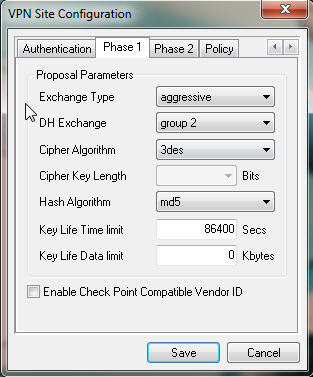
IPSec
- not a protocol ;
- framework to provide data CIA ;
- runs at Layer3 ;
- uses IKE to negotiate SA between peers ;
- two phases of negotiation :
1) IKE SA negotiations ;
2) IPSec SA Negotiations ;

- framework to provide data CIA ;
- runs at Layer3 ;
- uses IKE to negotiate SA between peers ;
- two phases of negotiation :
1) IKE SA negotiations ;
2) IPSec SA Negotiations ;


Software used is Shrew Soft's VPN Client.
This is a nice webinar : https://learningnetwork.cisco.com/videos/1157Monday, May 21, 2012
ASA Basic Firewall Config
Step1
ASA(config)# enable password mysecretpassword
Step2
ASA(config)# username admin password Pa55w0rd
! use this LOCAL username to authenticate for SSH connections
ASA(config)# aaa authentication ssh console LOCAL
ASA(config)# crypto key generate rsa modulus 1024
! Specify the hosts allowed to connect to the security appliance.
ASA(config)# ssh 10.1.1.1 255.255.255.255 inside
ASA(config)# ssh 200.200.200.1 255.255.255.255 outside
Step3
ASA(config)# int Gi0/1
ASA(config-if)# nameif inside
ASA(config-if)# ip add 10.0.0.1 255.255.255.0
ASA(config-if)# security-level 100
ASA(config-if)# no shut
ASA(config)# int Gi0/0
ASA(config-if)# nameif outside
ASA(config-if)# ip add 200.0.0.1 255.255.255.0
ASA(config-if)# security-level 0
ASA(config-if)# no shut
Step4
! default route to the internet
ASA(config)# route outside 0.0.0.0 0.0.0.0 100.1.1.1
! route to internal network
ASA(config)# route inside 192.168.1.0 255.255.255.0 192.168.1.1
ASA(config)# enable password mysecretpassword
Step2
ASA(config)# username admin password Pa55w0rd
! use this LOCAL username to authenticate for SSH connections
ASA(config)# aaa authentication ssh console LOCAL
ASA(config)# crypto key generate rsa modulus 1024
! Specify the hosts allowed to connect to the security appliance.
ASA(config)# ssh 10.1.1.1 255.255.255.255 inside
ASA(config)# ssh 200.200.200.1 255.255.255.255 outside
Step3
ASA(config)# int Gi0/1
ASA(config-if)# nameif inside
ASA(config-if)# ip add 10.0.0.1 255.255.255.0
ASA(config-if)# security-level 100
ASA(config-if)# no shut
ASA(config)# int Gi0/0
ASA(config-if)# nameif outside
ASA(config-if)# ip add 200.0.0.1 255.255.255.0
ASA(config-if)# security-level 0
ASA(config-if)# no shut
Step4
! default route to the internet
ASA(config)# route outside 0.0.0.0 0.0.0.0 100.1.1.1
! route to internal network
ASA(config)# route inside 192.168.1.0 255.255.255.0 192.168.1.1
Wednesday, May 16, 2012
Network Security Books
I bought two books today related to Network Security which will help me, since I started to teach Networking. Collecting and Reading of different books help me a lot in teaching.
The books are more expensive than Cisco Press books and I bought from Kinokuniya Book Store.
- Introduction to Network Security ( 112.33 SGD )
- Introduction to Security and Network Forensics ( 98.95 SGD )

The books are more expensive than Cisco Press books and I bought from Kinokuniya Book Store.
- Introduction to Network Security ( 112.33 SGD )
- Introduction to Security and Network Forensics ( 98.95 SGD )

Sunday, November 13, 2011

Thursday, September 30, 2010
ASA at-a-glance
I just started to explore about ASA, as I needed to implement a cisco firewall for one of my projects. Fortunately, Narbik also launched Site-to-Site VPN which is sample part of his CCIE Security Workbook. I would advocate that his book is incredibly awesome because of the way he explains and the topology he designs for the labs.
 Furthermore, I recommend to check the ASA specifications and models comparison at the Cisco website. It will be useful for pre-sales engineers.
 Furthermore, I recommend to check the ASA specifications and models comparison at the Cisco website. It will be useful for pre-sales engineers.
Saturday, September 18, 2010
0x41 & 0x1
For Cisco ASA Password Recovery, just memorize 0x41 & 0x1. Simply Enough!
rommon #1>confreg 0x41,
which tells the appliance to ignore its saved (startup) configuration upon boot.
asa(config)#config-register 0x01
While still in Configuration Mode, reset the configuration register to the default of 0x01 to force the security appliance to read its startup configuration on boot.
rommon #1>confreg 0x41,
which tells the appliance to ignore its saved (startup) configuration upon boot.
asa(config)#config-register 0x01
While still in Configuration Mode, reset the configuration register to the default of 0x01 to force the security appliance to read its startup configuration on boot.
Subscribe to:
Posts (Atom)